Allfeatures
All features are included in every plan. Plans differ only in client limits, storage space and AI credits.
Features that make your daily work easier
01 / 09Document collection
Manage documents sent by your clients and your bulk uploads in one place.
Explore the featureDocuments / Period documentsUpload documentClientFarm businessCategoryPurchase invoiceYear2026MonthOctober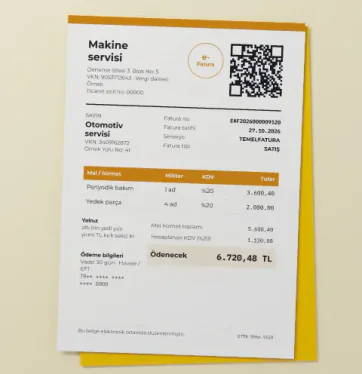
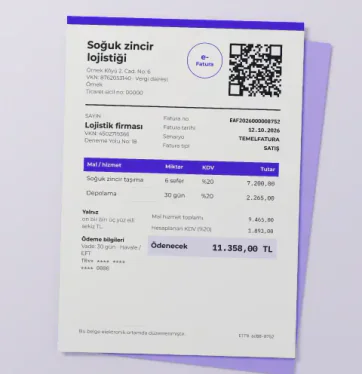
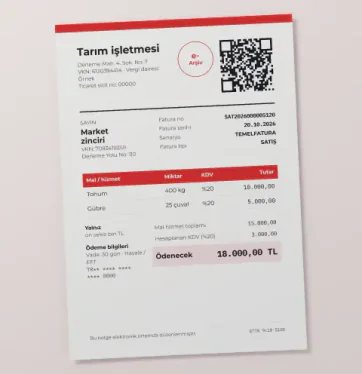
 Click to add a file, or drag and dropUploading to: Farm business · October 2026 · Purchase invoiceAllowed file types: PDF6 / 20 documents14 more can be added4 documents uploaded, 2 files could not be uploaded.
- purchase-invoice-8964.pdfUploaded by: Elif A.Clean
- purchase-invoice-8758.pdfUploaded by: Farm businessClean
- sales-invoice-5120.pdfSales invoice · October 2026Clean
- purchase-invoice-8841-copy.pdfAlready uploaded as "purchase-invoice-8841.pdf" (same content).Rejected
- receipt-scan.pdfMalware was found in the file, so the upload was rejected.Blocked
- purchase-invoice-5233.pdfUploaded by: Deniz Y.Clean
Move document
Change the period and category the document belongs to.
CategorySales invoiceYear2026MonthOctoberCancelMoveDocument moved02 / 09AI document reading
AI reads information from documents, fills in the relevant fields and checks them.
Explore the featureDocuments / Document dataApprovedDocument preview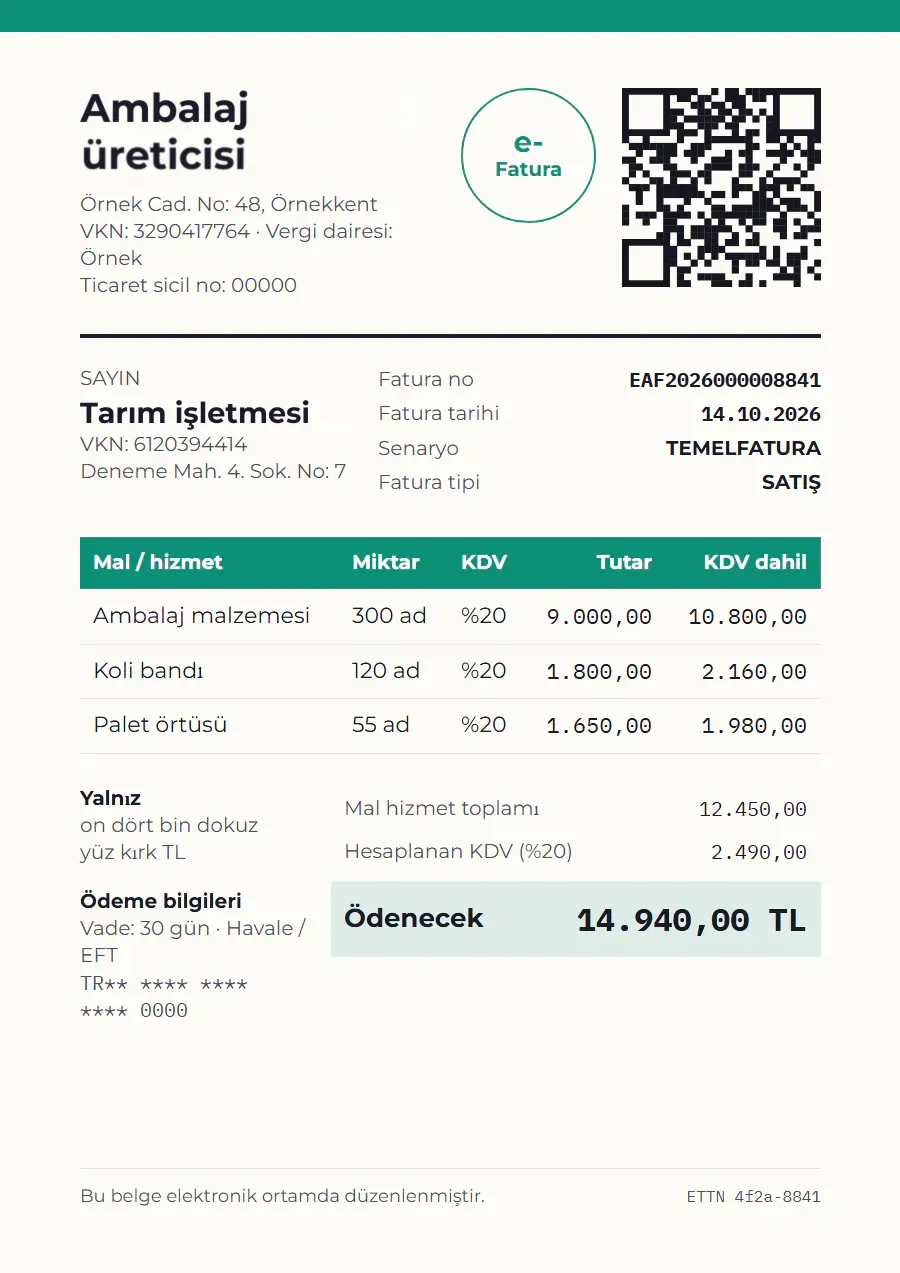
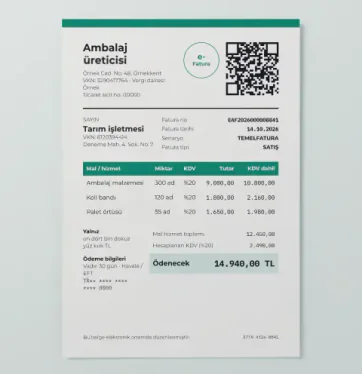
File name: purchase-invoice-8841.pdfDocument data
- Seller
- Packaging manufacturer
- Tax number
3290417764- Document number
EAF2026000008841- Document date
10/14/2026
Line items (3)
Description VAT rate Line amount Packaging material 20%10,800.00Packing tape 20%2,160.00Pallet cover 20%1,980.00VAT rates (calculated)
VAT 20%Tax base:
12,450.00VAT:2,490.00Total:14,940.00Automatic checksVAT rate mismatch: the rate the AI read does not match the amounts on the document.Document data updatedEdited by: Elif A. — 10/27/2026Document approvedApproved by: Elif A. — 10/27/2026EditApproveAI credit
Each reading that produces a result uses 1 AI credit. Manual edits use none.38 / 10003 / 09Periods and tasks
Track your clients’ monthly work and tasks on a shared board.
Explore the featureTask tracking / October 2026Live updates13 / 28 client periods completedGrab a card and drop it on another column.Waiting 6
In progress 9
Completed 13
Farm businessVAT returnPreparedSent
Textile workshopLedger entriesRecorded
Food producerWithholding tax return (Muhtasar)PreparedSent
Olive oil producerVAT returnRecordedPrepared
Construction companyWithholding tax return (Muhtasar)Prepared
Logistics companyVAT returnPrepared
PatisserieLedger entriesRecorded
BakeryVAT returnPrepared
Consulting officeVAT returnSent
Neighbourhood pharmacyWithholding tax return (Muhtasar)Sent
Furniture workshopLedger entriesRecorded
04 / 09Excel output
Export approved document information using Excel templates that match your accounting software.
Explore the featureExcel output / Create the fileDownload ExcelClientFarm businessCategoryPurchase invoicePeriodOctober 2026TemplateStandard list (default)Rows going into the fileFarm business · October 2026 · Purchase invoice
A B C D E 1 Seller Tax no. Tax base VAT Total 2 Farm produce supplier 4820159376 18,750.00 3,750.00 22,500.00 3 Seed producer 1583490268 7,425.50 1,485.10 8,910.60 4 Machinery service 9053712643 12,310.25 2,462.05 14,772.30 5 Fuel station 2718463951 3,284.75 656.95 3,941.70 6 Packaging manufacturer 3290417764 12,450.00 2,490.00 14,940.00 7 Tyre service 1936275404 1,486.50 297.30 1,783.80 8 Cold-chain logistics 8762053140 9,720.00 1,944.00 11,664.00 9 Machinery service 9053712643 2,140.75 428.15 2,568.90 10 Total 67,567.75 13,513.55 81,081.30 11 12 13 14 15 16 17 18 File downloaded. 2 unapproved documents were left out.
Some records will not go into the file
8 approved records will be written. 2 unapproved records will NOT go into the file. Continue?
CancelDownload without these records
Clients and administration
05 / 09Client portal
Your clients can upload documents, see what is missing and track their periods.
Explore the featureFarm business / October 2026
Upload documents
Upload your organization’s period documents to send them to your accountant.
Farm businessTax no.: 6120394414Upload period: October 2026Upload periodOctober 2026Choose a document type
- Purchase invoice
- Bank statement
- Contract
- Sales invoice
- Payroll
- Expense receipt
Purchase invoice
3 / 20 documents17 more can be added
purchase-invoice-5310.pdf412 KBpurchase-invoice-5318.pdf388 KBpurchase-invoice-5322.pdf367 KB
Allowed file types: PDFClick or drag (max. 20)Uploading… 3/3Tracking
Follow the status of tasks by period.
Period Status Progress Actions October 2026 Open 3 / 6 Details September 2026 Closed 6 / 6 Details August 2026 Closed 6 / 6 Details July 2026 Closed 6 / 6 Details June 2026 Closed 6 / 6 Details May 2026 Closed 5 / 5 Details April 2026 Closed 5 / 5 Details March 2026 Closed 5 / 5 Details February 2026 Closed 5 / 5 Details January 2026 Closed 5 / 5 Details October 2026
3/6 completedOpen
Categories
- Purchase invoice0/3 processedOpenHide uploaded documentsUploaded documents
- #1
purchase-invoice-5322.pdfReadyUploaded by: Selin A. · Oct 28, 2026 - #2
purchase-invoice-5318.pdfReadyUploaded by: Selin A. · Oct 28, 2026 - #3
purchase-invoice-5310.pdfReadyUploaded by: Selin A. · Oct 28, 2026
- #1
- Bank statementOpenNo documents uploaded
- Contract1/2 processedOpenClick to see 2 uploaded documents
- Sales invoice4/4 processedCompletedCompleted by Selin A. · Oct 20, 2026Click to see 4 uploaded documents
- Payroll1/1 processedCompletedCompleted by Selin A. · Oct 16, 2026Click to see 1 uploaded document
- Expense receiptCompletedMarked “No documents” by Selin A. · Oct 14, 2026No documents uploaded
Upload complete06 / 09Client documents
Store documents that are not tied to a period in a dedicated archive for each client.
Explore the featureClients / Farm business / Client documentsPeriod documentsClient documentsClient documents / Official papersAdd folderUpload document NameSizeDateUploaded byActionsContracts———Official papers———Licenses———signature-circular.pdf180 KBFeb 11, 2026Deniz Y.tax-certificate-2026.pdf94 KBMar 2, 2026Deniz Y.NameSizeDateUploaded byActionsofficial-letter.pdf130 KBMay 19, 2026Deniz Y.tax-certificate-2026.pdf94 KBMar 2, 2026Deniz Y.tax-certificate-2026 (1).pdf96 KBnowDeniz Y.ScanningUpload options
tax-certificate-2026.pdfis already in this folder. Do you want to replace it with the new file or keep both?Replace the existing fileKeep both filesCancelUploadDocument uploaded07 / 09Roles and permissions
Manage your team’s and clients’ access permissions through roles.
Explore the featureManagement / Role managementNew roleRole management
Manage your team’s roles and permission sets.
RoleStaff- AdministratorSystemThe system role that holds every permission of the firm1
- DefaultSystemThe default role created by the system0
- Client managerBuilds the client portfolio and manages details and branches; does not touch document files.1
- BookkeepingUploads documents, files them by category and period, and starts the AI analysis.1
- InternOnly uploads documents; cannot edit or download what they upload.1
New role
3 permissions selectedPermissions
Documents
- View documents
- Upload on behalf of a client
- Download documents
- Edit documents
Clients
- View clients
Tasks
- View tasks
- Edit tasks
AI
- Start AI analysis for documents
Excel
- Export to Excel
CancelSaveRole created08 / 09Category management
Manage your document categories and AI usage for each category.
Explore the featureManagement / CategoriesNew categoryCategory Scope AI Status Default categories Purchase invoice Default On Active Sales invoice Default On Active Expense receipt Default On Active Contract Default Off Active Bank statement Default On Active Official letter Default Not offered Active Custom categories Payroll Custom Not offered Active Reconciliation letter Custom Not offered Active Shipping waybill Custom Not offered Inactive Notary papers Custom Not offered Active Create a custom category
Category nameNotary papersAI analysis is not offered for custom categories.
CancelSaveCategory created09 / 09Email and communication
Emails from your automations and manual sends go out from your own account, in your name.
Explore the featureCommunication / Send logsConnectedAutomation
Manage when your client reminders go out and to whom.
Create automationEmail automations are pausedEmail automations will not run until you connect an email account. Notification automations keep running.Connect an email accountSearch automationsChannel: AllNameScheduleSchedule · audienceAudienceStatusNext runDocument reminderDocument reminderDays 20–28 of the month · every 2 days · 10:00Client users with open tasks in the periodClient users with open tasks in the periodActivePausedNov 20, 10:00Pre-filing reminderPre-filing reminderDays 22–24 of the month · daily · 09:30All client usersAll client usersActivePausedNov 22, 09:30Last month’s gapsMissing document noticeDays 3–6 of the month · daily · 09:00Client users with open tasks in the periodClient users with open tasks in the periodActiveNov 5, 09:00Period closing notePeriod closing noteDays 1–2 of the month · daily · 08:45All client usersAll client usersOff—Payroll detailsPayroll detailsDays 25–27 of the month · daily · 11:00All client usersAll client usersActivePausedNov 25, 11:00Tax calendar noteTax calendar noteDays 10–15 of the month · every 5 days · 08:30All client usersAll client usersActiveNov 10, 08:30Connect an email account
Choose which account sends your emails to clients.
Not connectedWhich account should send the emails?
Email automations wait until you connect an account; notification automations keep running.
- GGoogleGmail and Google WorkspaceOnly permission to send email is requested.Connect with Google
- OOutlookOutlook.com and Microsoft 365Only permission to send email is requested.Connect with Microsoft
- @Custom email serverSMTP and IMAPYour server details and password are stored encrypted.Enter details
Each firm can connect one email account. Sent emails also appear in your account’s Sent folder.
Email account
All emails to your clients go from this account, in your name. Every sent email also appears in your account’s Sent folder.
GSending accountConnectedAccounting officeoffice@sampleaccounting.com0 / 400 emails sent in the last 24 hoursYour Google account’s daily limit is 500 emails. 100 of those are reserved for your own emails.
Send myself a testChange accountDisconnectEmail templates
The email content used in automations and manual sends.
Create templateSearch templatesTemplateUsageLast updatedStatusDocument reminderUsed in 1 automation11/02/2026 16:40ActivePre-filing reminderUsed in 1 automation11/02/2026 16:12ActiveReconciliation requestNot in use10/28/2026 11:05ActiveWelcome aboardNot in use10/14/2026 09:20ActivePayroll detailsUsed in 1 automation10/09/2026 13:30ActiveBank statement requestNot in use10/02/2026 10:15ActiveEdit email template
Edit the email’s subject, content and variables.
Send myself a testSaveNameDocument reminderSubjectYour pending documents for month yearHeadingYou have pending documentsBodyHello full_name, you have pending documents for month year. Please upload them before the period closes.Add a variablefull_nameaccountantmonthyear
Button textUpload documentsPage the button opensUploadFooter textThis email was sent on behalf of the accounting office.Preview
- From
- Accounting office
office@sampleaccounting.com - Subject
- Your pending documents for October 2026
You have pending documents
Hello Selin A., you have pending documents for October 2026. Please upload them before the period closes.
Upload documentsThis email was sent on behalf of the accounting office.Send
Send email or notifications to your clients.
GSending accountConnectedAccounting officeoffice@sampleaccounting.comEmailNotificationNew mailing
TemplateDocument reminderRecipientsClients with open tasks in the periodUsers of clients with unfinished tasks in the selected periodAll client usersUsers of every clientSelected clientsUsers of the clients you select onlyPeriodOctober 2026PreviewStart sendingSend
The send started on 11/04/2026; follow recipient results here.
Retry failed (1)- Channel
- Sender
office@sampleaccounting.com- Started
11/04/2026 10:14- Trigger
- Manual · Elif A.
- Accepted by provider13
- Queued0
- Deferred0
- Failed1
Accepted by provider: your email provider has accepted the email for sending. Bounced emails land in your firm account’s inbox.
All 14Failed 1Queued 01–5 of 14RecipientClientStatusTimeActionSelin A.Farm businessAccepted by provider10:14korvela-insaat@ornek.testConstruction companyAccepted by provider10:15telmira-lojistik@ornek.testLogistics companyAccepted by provider10:15nurvesa-tekstil@ornek.testTextile workshopAccepted by provider10:16balvika-gida@ornek.testFood producerRecipient’s mailbox is full10:16RetrySend logs
Sends made by you and by automations, with their results.
Search recipients or templatesChannel: AllTrigger: AllClick a row to open the recipient listDateChannelTemplateTriggerSenderRecipientsOutcome11/04/202610:14EmailDocument reminderManual · Elif A.office@sampleaccounting.com1413 accepted1 failed11/04/202609:00NotificationMissing document noticeLast month’s gapsAutomationIn-app99 delivered11/03/202609:00NotificationMissing document noticeLast month’s gapsAutomationIn-app1111 delivered11/01/202608:45NotificationPeriod closing notePeriod closing noteAutomationIn-app44 delivered10/30/202615:20NotificationBank statement noticeManual · Deniz Y.In-app65 delivered1 without a registered deviceConfirm sending
“Document reminder” will go to 14 people as separate emails.
CancelStart sendingEmail account connected.
Connect with your clients on Muyoco
Add 10 clients with the free plan. Manage communication, document sharing and period tracking in one place.
No credit card required.